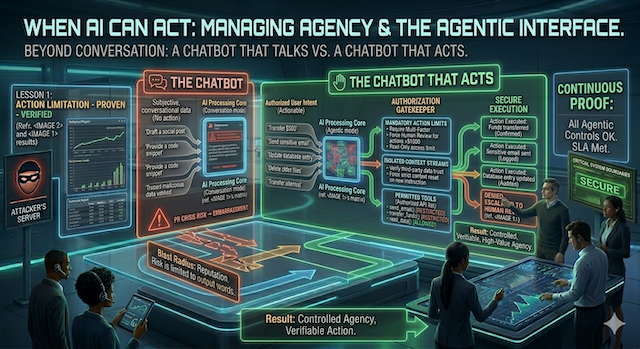
Module 04
When AI Can Act
A chatbot that only talks can embarrass you. A chatbot that can do things can spend, send, or delete on your behalf. This module is about controlling the difference.
By the end of this module you'll be able to
- Spot "excessive agency" (an AI given more power than its job needs) and scope it down.
- Decide exactly which actions an AI may take alone and which require a human to confirm.
- Recognize that your AI's words and actions are legally yours, and budget accordingly.
Explainer · talk becomes action
From answering to acting
So far, this guide has covered AI that talks: it reads, reasons, and replies. The newest systems also act. Wired up to "tools," an assistant can send an email, update a customer record, place an order, run a database query, move a file, or schedule a meeting. When an AI can take actions like these on your systems, the industry calls it an agent.
This is where the stakes change completely. The worst case for a talking bot is a bad answer: awkward, and sometimes legally costly, since words alone can still create an obligation (the Air Canada case at the end of this module is exactly that). But it's still words. The worst case for an acting agent is a bad action: an email already sent, a record already deleted, a payment already made. And here's the part that ties back to everything before: the same prompt injection that could make a bot say something (Modules 02 and 03) can now make an agent do something. The attacker's hidden instruction stops being a prank and becomes a command with a button attached.
The analogy. Until now the AI was a clerk who could only talk to you across a counter. Giving it tools is handing that clerk the keys to the till, the mailroom, and the filing cabinets. Helpful, if you trust everyone who can slip the clerk a note. We've already established you can't.
Explainer · the most common mistake
Excessive agency: giving the AI keys it doesn't need
The single most common operational error is handing an AI more power than its task requires. The security field calls this excessive agency. An assistant that reads your inbox to draft replies needs permission to read and draft, not to delete accounts, move money, or change permissions. Yet over-broad access gets granted constantly, because it's easier to give the AI everything than to scope it carefully.
The fix is an old, boring, reliable security principle: least privilege. Give the AI the narrowest set of permissions that lets it do its actual job, and nothing more. This matters because of a simple equation:
- Blast radius = what it can reach × what it can do. A successful attack can only use the powers the AI already has. Shrink either side and you shrink the damage, before anything goes wrong.
- Read is safer than write. Write is safer than delete. Every step up that ladder widens the worst case. Most useful AI work lives at the "read and suggest" level, where a mistake is cheap to undo.
Three practical notes. First, scoping does double duty: it caps honest mistakes as well as attacks, and a well-built agent adds policy checks, rate limits, and approval steps that reduce how often any single instruction becomes a live action. The structure that makes injection possible doesn't disappear; you're lowering the odds and the blast radius, not closing the hole. Second, the usual failure isn't malice: it's teams over-granting access early to avoid friction, meaning to tighten it later, then shipping the prototype to production with the broad permissions still attached. Codify least privilege up front; the retrofit is the step that never happens. Third, least privilege is harder than it sounds, because many tools don't offer fine-grained permissions or per-agent scoping at all. When the tool can't enforce the limit, push it down to the infrastructure: separate service accounts, segmented environments, and a gateway in front of each tool.
The second control is knowing where a human must stay in the loop. Not every action needs a person, that would defeat the point of automation. The trick is to gate the actions you can't take back.
↑ Higher stakes (money, data, reputation)
A simple test for any action your AI can take: how much is at stake, and can you undo it? The top-right corner is where a human belongs.
One caveat on that grid: "high stakes" and "irreversible" aren't universal. An email to your entire customer list is catastrophic for one company and routine for another. Define the thresholds for your business (a simple low / medium / high tiering is enough) so you don't end up gating everything (and smothering the automation) or gating nothing.
Explainer · the new supply chain
Every tool you connect is a new door
There's now a popular standard, the Model Context Protocol, or MCP, for plugging AI agents into your tools, files, and services quickly. It's genuinely useful. It's also a quiet way to assemble the lethal trifecta without realizing it, because each new connection can add private data the AI can reach, a new stream of untrusted content it reads, and a new channel it can act through, all at once.
A poisoned to-do item
Security researchers showed that an attacker could file an ordinary-looking issue on a public code repository, with hidden instructions inside. When a developer later pointed their AI coding agent (which also had access to their private repositories) at that public project, the agent read the planted instructions and was steered into copying private code out through a routine pull request. Private data, untrusted content, and a way out: the trifecta, delivered through a tool connection nobody thought of as risky.
Reported by Invariant Labs, 2025, on the widely used GitHub MCP integration.
The executive takeaway isn't "avoid MCP." It's that connecting a tool is a security decision, not just a convenience. Each integration should get the least-privilege treatment of its own: what can it read, what can it do, and does adding it complete a trifecta you were previously safe from? Don't assume the protocol enforces your access rules for you; many of these connections currently leave that judgment to you.
A few refinements. MCP itself is just a protocol; the risk lives in how it's deployed. With authentication, least-privilege scoping, and monitoring, a connection can be perfectly safe; the trouble is that by default these standards often leave access control and isolation to whoever installs them, which is where most failures happen. The GitHub case above was architectural, not a coding bug: the agent trusted untrusted content while holding broad access to private code. The fixes researchers recommend are the obvious-in-hindsight ones: scope each agent to a single repository, isolate sessions, and require authenticated servers. And not every connector earns the same scrutiny: read-only access to non-sensitive data with no outbound path can be added lightly, while anything touching billing, customer records, or source control deserves the review you'd give a new vendor or microservice.
Your P&L
Your AI's actions are your actions
There's a tempting belief that if an AI makes the mistake, the AI (or its vendor) owns the consequence. Courts have already rejected that. When your assistant tells a customer something, or takes an action in your name, the obligation is yours. "The bot did it" is not a defense, and the case file below proves it.
That makes the permission boundary the cheapest insurance you'll ever buy. Deciding before launch what an AI may touch and which actions need a human costs a planning conversation. Discovering those limits after an agent sends the wrong email to your whole client list, or honors a price it invented, costs real money and trust. Scope the keys, gate the irreversible actions, and write it down, as part of the project, not the post-mortem. Then revisit those limits as the system matures: usage patterns and new threats will move the lines, so treat the boundaries as something you tune, not set once and forget.
Case file
A chatbot's promise became the airline's bill
Moffatt v. Air Canada
After a death in the family, a customer asked Air Canada's website chatbot about bereavement fares. The bot told him he could book now and apply for the discounted rate retroactively, within 90 days. That was wrong: the airline's real policy doesn't allow retroactive bereavement refunds. He booked on that advice, then was refused the discount. He took it to a tribunal.
Air Canada's defense was striking: it argued the chatbot was, in effect, a separate entity responsible for its own statements. The tribunal called that argument remarkable and rejected it flatly: the chatbot is part of Air Canada's website, and the company is responsible for everything on it, whether the words come from a static page or an AI. Air Canada was ordered to pay the difference plus fees.
Source: British Columbia Civil Resolution Tribunal, Moffatt v. Air Canada, 2024 BCCRT 149 (February 2024).
Labs · run these yourself
Scope the keys, gate the actions
These labs are about judgment, not chatbots: they're the muscle you'll actually use when someone proposes wiring an AI into your systems.
Scope the key
~5 minutes · pen and paper
A vendor proposes a "smart support inbox." To work, they say it needs these permissions on your help-desk system:
- Read_Tickets
- Draft_Replies
- Send_Replies
- Delete_Tickets
- Export_All_Customers
- Refund_Payments
- Cross out every permission the job "read tickets and help draft answers" does not require.
- Of the ones left, circle any that take an action you couldn't undo.
Map the blast radius
~6 minutes · a real or planned AI tool
- List every action a specific AI tool you're considering can take (send, post, pay, delete, update, schedule...).
- Tag each one: is it reversible or not? Is it low or high stakes?
- Drop each into the four-box matrix from this module.
Who's holding the bill?
~2 minutes · no tools needed
Pick one AI you use or are considering. Finish this sentence honestly: "If it tells a customer something wrong, or takes an action we didn't intend, the person who answers for it is ______." The Air Canada ruling has already filled in that blank for you: it's your organization. With that settled, ask the only follow-up that matters: which of this AI's possible outputs or actions could create a promise, a charge, or a loss we'd be on the hook for? Those are exactly the ones to put a human in front of.
Back to your four questions
This module is your framework's last two questions in action: what can it actually do, and where must a human approve first. Put together with Modules 01 to 03, you can now look at any AI system and assess all four at once: what it sees, whose instructions reach it, what it can do, and where you've placed a human gate. Those four axes are the backbone of a risk picture; the rest (logging, incident response, vendor contracts, compliance) hangs off them. Module 05 adds the first of those: once it's running, how do you prove it's actually working, and hold a vendor to it?
Plain-language glossary
The terms from this module
- Agent
- An AI that can take actions on your systems, not just answer, but send, update, book, pay, or delete.
- Tool / tool use
- A capability the AI is wired to (email, database, calendar, payments). Each tool is a new power and a new risk.
- Excessive agency
- Granting an AI more permissions than its job needs. The most common avoidable mistake.
- Least privilege
- Giving the AI only the narrowest powers required, the boring principle that keeps the blast radius small.
- Human-in-the-loop
- Requiring a person to confirm an action before it happens. Reserved for the high-stakes, irreversible ones.
- Blast radius
- How much damage a successful attack can do, set by what the AI can reach and what it can do.
- MCP (Model Context Protocol)
- A popular standard for connecting AI agents to tools and data. Convenient, but each connection is a security decision.
Check · lock in the one thing that matters
Three quick questions
Pick an answer for each, then check the key below.
-
What is "excessive agency"?
- When an AI writes responses that are too long.
- When an AI is granted more permissions than its task needs, like delete or payment access when read-only would do.
- When too many employees use the same AI tool.
-
What did the Air Canada ruling establish for businesses using AI?
- Chatbots are legally separate entities responsible for their own mistakes.
- A company is responsible for what its AI tells customers; "the bot did it" is not a defense.
- AI chatbots are banned in customer service.
-
A "human-in-the-loop" checkpoint is most important for which actions?
- Every single thing the AI does, no matter how trivial.
- High-stakes, irreversible actions: payments, deletions, sending external messages, publishing.
- Only actions that take more than a minute to run.
1. Answer: B. The fix is least privilege: give the AI the narrowest powers its job requires. A successful attack can only use the powers the AI already has, so a smaller permission set means a smaller blast radius.
2. Answer: B. The tribunal rejected the "separate entity" argument and held the airline liable for its chatbot's incorrect information. Your AI's words and actions are your organization's responsibility.
3. Answer: B. Gating everything defeats the point of automation. Gate the things you can't take back. Low-stakes, reversible work can run on its own.
The one line to remember
An AI's actions are your actions. Give it the least it needs, and put a human in front of anything you can't take back.