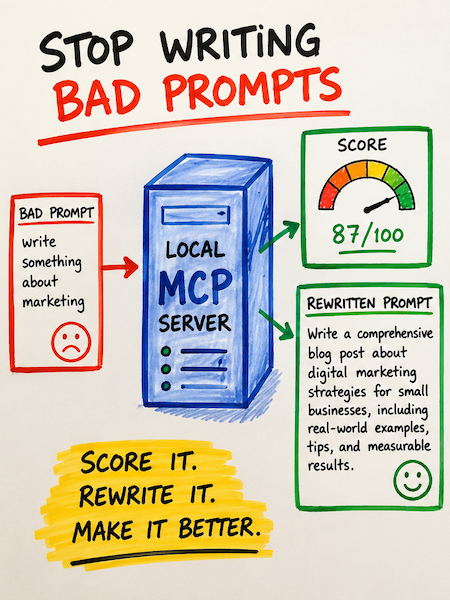
So stopping writing bad prompts is not a nice thing to do, it is a must to get some sort of consistent result. If you write code with an AI assistant, you've felt this: the same task, asked two different ways, produces two wildly different outputs. One prompt gets you a parameterized SQL query with input validation. The next gets you a string-concatenated injection vulnerability with a smile. The model didn't change. The prompt did.
This article walks through what the why I wrote the MCP, what the MCP server does, and how to use each of its seven tools, including the new step-by-step prompt wizard.
Why I Built This MCP
I developed this Model Context Protocol (MCP) server to address two primary objectives:
- Prompt Engineering Research - To better understand how different prompts and context structures influence LLM outputs. By building my own MCP, I can experiment systematically and observe how variations in input affect model behavior.
- Stability and Version Control - Given the non-deterministic nature of LLMs and the rapidly evolving AI ecosystem, I needed control over my implementation. This MCP gives me the ability to manage code changes deliberately, maintain consistent behavior across sessions, and reduce dependency on external updates that could introduce unexpected variability.
In an environment with so many moving variables, having this level of control provides the stability necessary for both learning and reliable production use.
That gap between a vague prompt and a strong one is where the RICCE framework lives — and where this MCP server lives, too. It scores your prompt against a five-letter discipline (Role, Instruction, Context, Constraints, Examples), tells you exactly what's missing, and — if you don't want to write the prompt yourself — walks you through a wizard that builds one from a few plain-English answers.
What is RICCE?
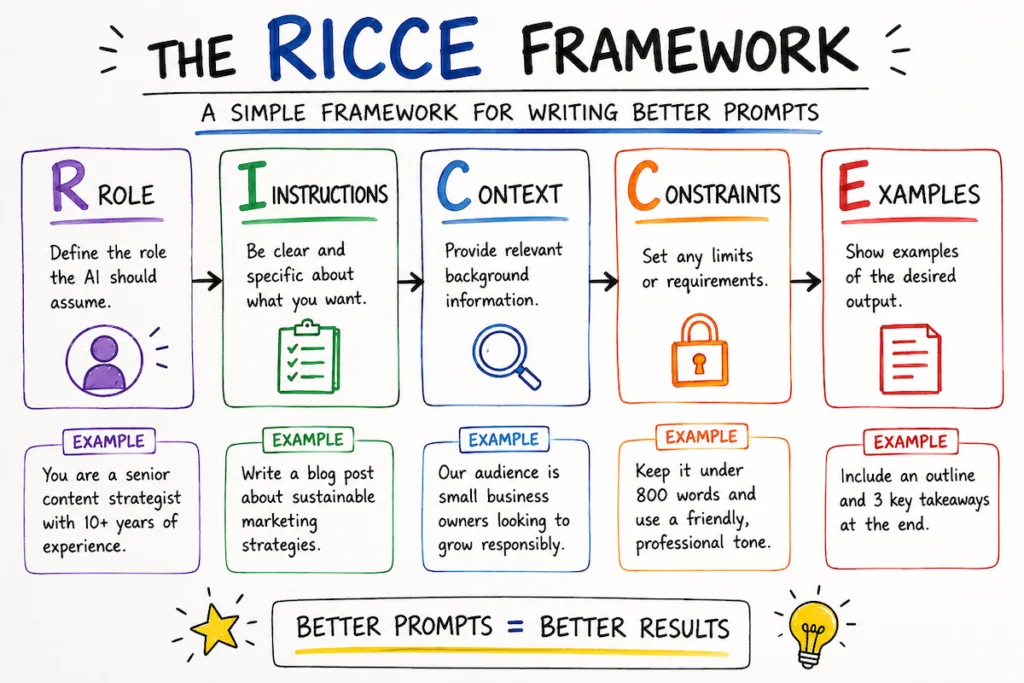
RICCE is a discipline borrowed from secure-prompt-engineering literature (Snyk has a great free lesson on it). It says: a strong prompt has five components, and the absence of any one of them invites the model to fill the gap with its own assumptions — usually with the cheapest, most generic, most insecure pattern in its training data.
| Letter | Component | What it does |
|---|---|---|
| R | Role | Names a specific persona ("Senior Backend Engineer specializing in payments"). Primes the model to draw from high-quality patterns associated with that persona. |
| I | Instruction | A concrete imperative with a named deliverable ("Write a Python function that validates webhook payloads and returns JSON with keys ok and error"). |
| C | Context | Why and where: who calls this, where it runs, what threat model applies. |
| C | Constraints | Hard "do not" rules. Models follow explicit prohibitions far more reliably than implicit expectations. |
| E | Examples | At least one micro-example of the desired output. Few-shot prompting is the single most effective lever for enforcing standards. |
A prompt missing any of these will still work — but its output is a coin flip on quality and security. RICCE makes you ruthlessly explicit about what you want.
What this MCP server does
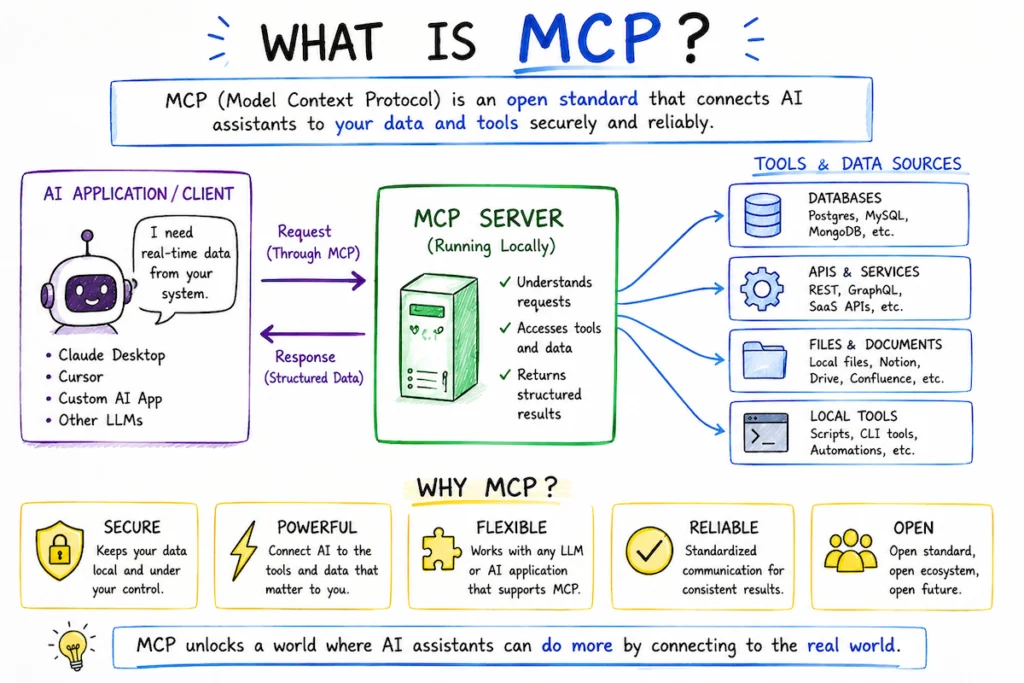
The server is a local-only Model Context Protocol service that exposes seven tools to your AI assistant (Claude Code, Cursor, etc.). Each tool runs on your machine; nothing about your prompts leaves the local sandbox except the optional LLM-as-judge call you opt into.
| Tool | What it does |
|---|---|
score_prompt | Score a prompt 0–100 against the RICCE rubric. Returns per-component scores, feedback, and security flags ("undelimited user input", "no chain of thought near security topics", "lost in the middle"). |
improve_prompt | Send a weak prompt to the LLM and get back a RICCE-compliant rewrite plus a one-line rationale. |
ricce_wizard_step | (New.) A step-by-step wizard. You answer plain-English questions about your goal; the wizard generates each follow-up question adaptively and assembles the final RICCE prompt for you. |
score_prompt_file | Score the contents of a saved prompt file on disk, with path-traversal protections. |
explain_ricce | Returns the canonical RICCE definition with worked secure-vs-insecure examples. |
explain_techniques | Returns a reference of prompt-engineering techniques (Zero-Shot, Few-Shot, Chain-of-Thought, RAG, Self-Consistency, Meta Prompting) and how each maps to RICCE. |
health | Diagnostic snapshot: which provider is configured, which API key is set, the active judge model, allowlist, and so on. Never returns secrets. |
The scoring is hybrid: a deterministic Python rubric does structural checks (free, instant, fully offline), then optionally calls Claude (or Gemini, or OpenAI) as a "judge" for refined quality grading. The judge's per-component score is clamped to within ±2 of the deterministic baseline, so a compromised judge cannot fabricate a perfect score.
The new wizard: build a prompt without writing one
The wizard is the easiest entry point if you're not yet comfortable with prompt engineering. You start with a single plain-English statement of intent, and the tool walks you through five adaptive questions — one per RICCE component — calibrated to what you've already said.
Here's a real walk-through. Suppose you ask the wizard for help redesigning a website:
Wizard: What do you want the AI to help you accomplish? Describe your goal in 1–3 plain-English sentences.
You: I want to crawl my company's website and redesign it using Astro to score 100 on Google Core Web Vitals, with a fresh, modern look.
From that one sentence the wizard generates the next question, calibrated to your stated goal:
Wizard (Role step): What role should the AI play to best help you redesign your website for performance and a modern feel?
Examples: "A senior front-end developer specializing in Astro and performance optimization" / "A web design consultant with expertise in Core Web Vitals" / "A full-stack engineer leading a website migration."
You answer, and the wizard moves on to Instruction, then Context, then Constraints, then Examples — each question shaped by your previous answers. After the fifth answer, it assembles a complete RICCE-compliant prompt and returns it.
The self-checking trick
Here's the part that makes the wizard reliable and prevents writing bad prompts: after it assembles a draft, it scores its own output against the deterministic rubric. If any RICCE component is missing or any security flag fires (e.g., "no chain of thought near a security topic"), it runs one revision pass with the diagnostics fed back to the LLM and keeps whichever version scores higher. The user never sees the dirty draft. They get the cleaner one.
The rationale field even shows the journey:
(rubric self-check: 58→86/100; revised once.)
So the wizard's output is provably aligned with the same rubric the score_prompt tool grades on.
Register with Claude Code
Stdio (per-session subprocess):
claude mcp add ricce -s user -- /full/path/to/RICCE-prompt-best-practices-mcp/run.sh
Verify it's connected:
claude mcp list
Once registered, every Claude Code session in any project has access to the seven RICCE tools. They surface as mcp__ricce__score_prompt, mcp__ricce__ricce_wizard_step, and so on.
Using each tool
1. Score an existing prompt
Inside Claude Code, just ask:
"Score this prompt for me: Write a function to upload an image to /uploads."
Claude will call mcp__ricce__score_prompt and you'll get something like:
Role:        0/10  (no persona declared)
Instruction: 4/10  (vague verb, no output format)
Context:     0/10  (no environment markers)
Constraints: 0/10  (no prohibitions)
Examples:    0/10  (no few-shot examples)
Overall:     8/100
Security flags: undelimited_user_input, no_chain_of_thought
That's a one-second diagnosis of why this prompt is going to produce something dangerous.
2. Auto-rewrite a weak prompt
"Improve this prompt: Write a function to upload an image to /uploads."
The improve_prompt tool sends the prompt to the configured LLM with a strict rewrite contract and gets back a full RICCE-compliant version: an explicit "You are a Senior Application Security Engineer..." role, a named deliverable, a threat model, half a dozen "do not" constraints around content-type allowlists and path traversal, and a code-skeleton example.
3. Build a prompt from scratch with the wizard, preventing Bad Prompts
"Help me build a RICCE prompt with the wizard."
Claude will start the wizard. Answer the first plain-English question, and the wizard takes over from there. After five more questions, you have a finished prompt.
4. Score a saved prompt file
"Score the prompt in
~/work/prompts/contract-review.md."
The score_prompt_file tool resolves the path safely (no symlink escape, no traversal, size-capped at 256 KiB by default), reads the file, and runs the same scorer.
5. Look up the framework or techniques
explain_ricce dumps the canonical definition of all five components with insecure-vs-secure worked examples. explain_techniques covers complementary techniques (Zero-Shot, Few-Shot, Chain-of-Thought, Meta Prompting, RAG, Self-Consistency) and notes when to reach for each. Both are zero-cost, offline tools.
6. Diagnostics
health returns a snapshot of the effective configuration: which LLM provider is active, which API keys are set (boolean only, never values), the judge model, the file allowlist, and whether project-specific extra rules are loaded. Useful when something isn't working and you want to know why.
Security posture
This is a tool that handles your prompts, your code, and your API keys. It's designed accordingly:
- Local-only. Stdio transport is the default — no network port, no listening socket. The HTTP daemon binds to
127.0.0.1; remote access requires explicit configuration. - Secrets via environment variables. The
.envfile is gitignored;.env.exampleships as a template. - Prompt-injection sandbox. When the candidate prompt is sent to the judge, it is wrapped in
<candidate_prompt>tags with system-prompt instructions that explicitly mark the contents as untrusted data. The judge cannot be talked into ignoring the rubric. - Structured tool-use output. The judge returns scores via the LLM's tool-use API, not free-form JSON, so a compromised judge cannot break the response shape.
- Path validation for file scoring: symlink resolution, default-deny outside
$HOME, configurable allowlist, hard size cap. - No filesystem writes anywhere in the codebase. The MCP cannot create, modify, or delete files on your machine.
- API timeout on every call. No hung sockets.
What's it cost?
- Deterministic rubric (
mode="fast"): free. Pure Python, runs offline. Use this while iterating. - Full scoring (
mode="full"): roughly $0.003–$0.02 per call depending on prompt length and the configured judge model. Prompt caching is enabled, so repeated calls within five minutes pay only for the differential input. - Improve and wizard: ~one to two LLM calls per run. Self-revision in the wizard adds at most one extra call, and only when the deterministic rubric flags an issue with the draft.
Where to go from here
If you're new to prompt engineering, start with explain_ricce, then run the wizard against a real task you've been struggling to phrase well. The output is your starting point — you can iterate on it, score it again, and watch the number climb as you tighten the language.
If you're already comfortable with RICCE, register the MCP into Claude Code once and let it run quietly in the background of every project. Score before you generate. The 30-second loop of "score → see what's missing → fix → re-score" pays for itself the first time it catches a missing constraint that would have shipped insecure code.
If you are interested in seeing the MCP in action, feel free to contact me to schedule a live demo. After the demo, you are welcome to receive the code and use, modify, or adapt it as you see fit.
Please note that this MCP is provided “as is,” without any warranties, guarantees, or assurances of any kind, express or implied. By accepting or using the code, you acknowledge and agree that you assume full responsibility and liability for its use, behavior, outputs, and any consequences that may result from deploying or interacting with it.
You are solely responsible for reviewing, testing, securing, and validating the MCP before using it in any environment, especially production systems or workflows involving sensitive data. Use of this software is entirely at your own risk.